
How to Update Your WEEX Profile Information: A Step-by-Step Guide

Keeping your profile information updated on WEEX is essential for account security, smooth transactions, and enhanced user experience. Whether you need to change your email, phone number, or personal details, this guide will walk you through the process.
Why Updating Your Profile Information Matters
Maintaining accurate profile information ensures:
- Account Security – Helps prevent unauthorized access.
- Smooth Transactions – Ensures seamless deposits, withdrawals, and trading.
- Better Customer Support – Makes it easier to verify your identity if you need assistance.
Step-by-Step Guide to Updating Profile Information on WEEX
Step 1: Log into Your WEEX Account
- Visit WEEX’s official website and click the "Login" button.
- Enter your credentials and access your account.
Step 2: Go to Profile Settings
- Tap on your profile icon (located in the top-left corner of the home page).
- Select "Account Settings" from the dropdown menu.
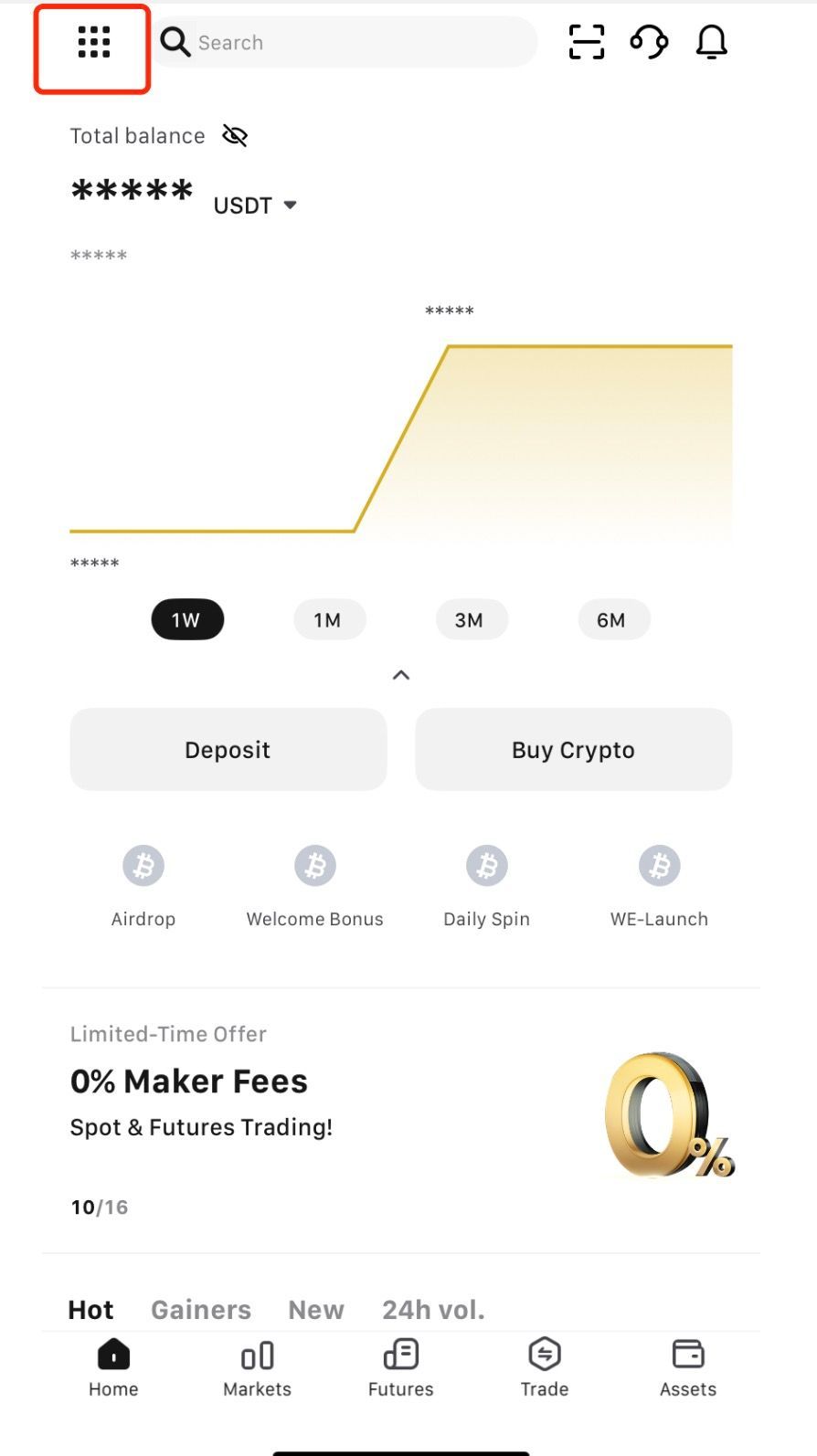
Step 3: Edit Profile Information
You can update the following details:
- Login Password – Regularly change your password to strengthen security.
- Mobile Number – Link an active phone number to enhance account protection.
- Email – Update your email address (verification of the new email may be required).
- Google Authentication – Manage your Google Authenticator settings for secure access.
- Two-Factor Authentication (2FA) – Enable or update 2FA for an extra layer of security.
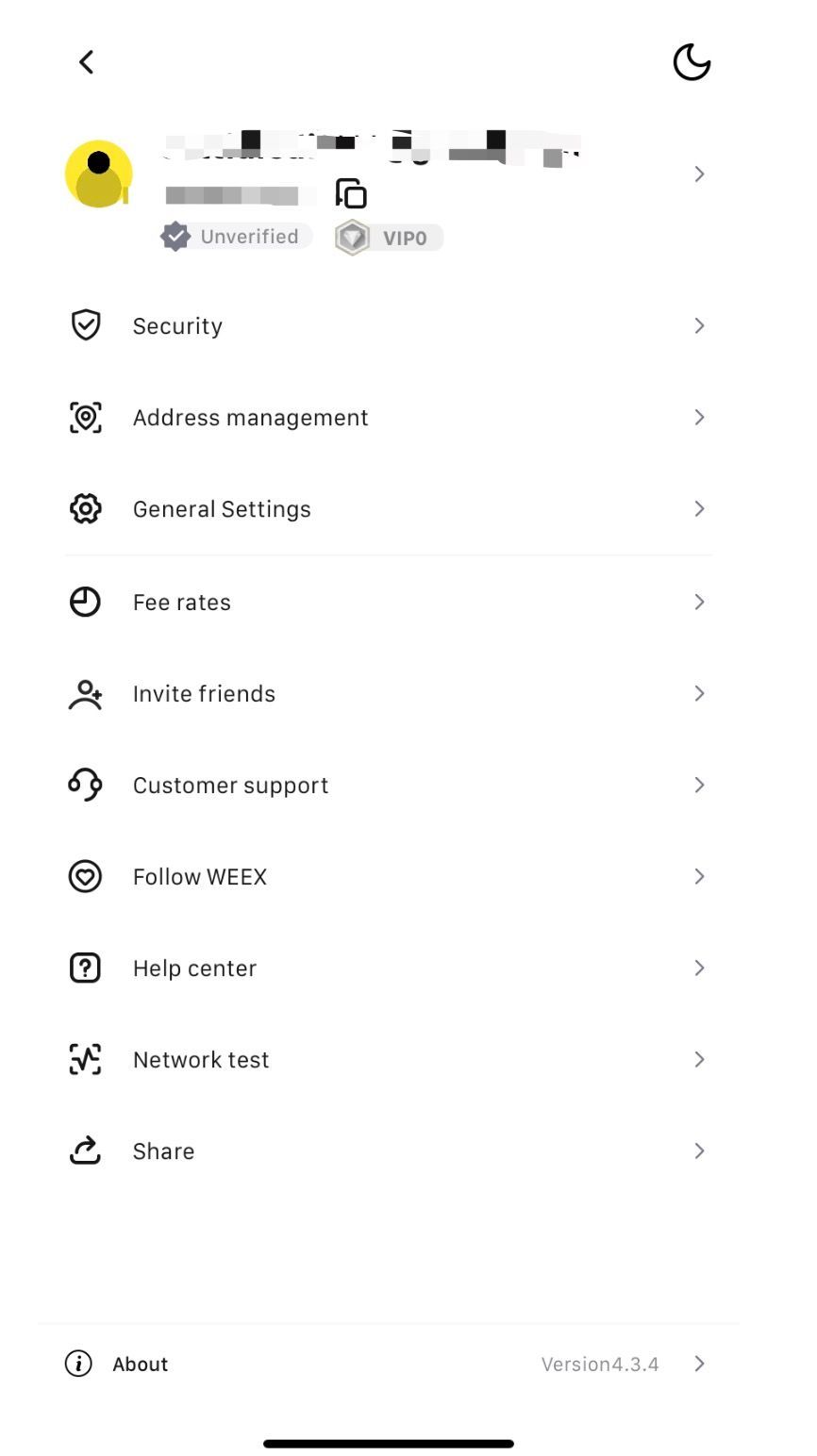

Step 4: Verify Your Changes
For security reasons, WEEX may send a confirmation code to your email or phone. Enter the code to complete the update.
Security Tips When Updating Your Profile
- Use a Strong Password – Mix uppercase, lowercase, numbers, and special characters.
- Enable 2FA – Adds an extra layer of security to prevent unauthorized access.
- Keep Your Email Secure – Since your email is key to account recovery, ensure it's protected.
Final Thoughts
Updating your WEEX profile information is a simple yet crucial step for account security and smooth trading. Regularly check and update your details to stay ahead of any potential security risks.
Need more help? Visit WEEX Support for assistance.
You may also like

What Is WEEX Token (WXT)? A Complete Guide
WEEX Token (WXT) is the native utility token within the WEEX ecosystem. Its main purpose is to improve the trading experience rather than serve purely as a speculative asset.
In simple terms, WXT is mainly used for fee discounts (the more you hold, the lower your trading fees), staking rewards, and participation in platform events and governance voting. It also allows users to engage more deeply in the WEEX ecosystem, including promotional campaigns and future Web3 integrations.
In terms of acquisition, users can typically buy WXT directly on the WEEX exchange using assets like USDT, or earn it through platform events. For storage, it can be kept in an exchange wallet for convenience or transferred to external wallets (such as cold wallets) for enhanced security.
From a tokenomics and market perspective, WXT’s value is closely tied to WEEX’s user growth, trading volume, and overall crypto market conditions, making it relatively volatile and high-risk. Analysts generally view it as more suitable for users interested in the long-term development of the platform rather than short-term speculation.
Overall, WXT is a “trading utility token” that enhances user experience through fee discounts, staking benefits, and eco

What is World Cup Doge (WCDOGE) Coin? Is WCDOGE a Good Investment?
What is WCDOGE crypto? Meme token or football fan play? Real data, honest risks, and how to buy World Cup Doge.

SIM Owner Details: Legal PTA Check and Safety Guide
Learn what SIM owner details means, how to check SIMs on your CNIC through official PTA channels, and how to avoid lookup scams.
NBIS Stock: What Nebius’ AI Cloud Surge Means Now
NBIS stock jumped as Nebius reported rapid AI cloud growth. See the key Q1 2026 numbers, catalysts, valuation risks, and what to watch next.

WXT Bounty Hunter Program Explained: Earn Crypto Rewards While Learning to Trade on WEEX
The WXT Bounty Hunter Program is a WEEX campaign running from May 8 to May 18, 2026, designed to help beginners learn crypto trading while earning rewards.
Users complete simple tasks like depositing USDT, trading WXT, and holding tokens to receive WXT rewards. New users can earn bonuses such as 200 WXT, while advanced users can compete for larger rewards based on trading activity, including a 100,000 WXT prize pool.
The program uses net metrics (deposits and buys minus withdrawals) to ensure fairness and excludes institutional trading. Holding 300 WXT also unlocks extra benefits like enhanced airdrops.
Overall, it combines learning and earning, making it an entry point into crypto trading on WEEX.

Grass Token Price: GRASS Live Data, Drivers, and Risks
Track Grass token price, market cap, supply, unlocks, and key GRASS price drivers before trading the Solana AI and DePIN token.

WCOR Coin Explained: World Collective Oil Reserve on Solana
WCOR coin is a Solana token tied to an oil-reserve registry narrative. Here’s what it claims, current data, and the risks traders should watch.

What Is SAOS Crypto? Can SAOS Hit $0.1?
Is SAOS crypto a hidden gem? Strategic American Oil Supply on Solana explained. No hype, just data: $75K cap, locked LP, RWA narrative.

KAIO Airdrop: Share 50,000 USDT on WEEX with 0-Fee Trading
Trade KAIO/USDT with 0 fees on WEEX from May 7–14, 2026. New users can complete deposit and spot trading tasks to share 50,000 USDT in rewards.

What Is SAOS? Strategic American Oil Supply Token Explained
SAOS is a meme token on Solana with a 75,000 USD market cap and 22,000 USD locked liquidity, positioned around oil supply themes but lacking real asset backing
It thrives on pure narrative speculation, with no utility, website, or doxxed team, making it highly volatile and attention-dependent
Traders should distinguish SAOS from legitimate real-world asset projects, as its branding is speculative rather than substantive
Positive aspects include locked liquidity reducing rug pull risks, but low trading activity signals high uncertainty

How to Buy Public Asset Control (PAC) Token in 2026: Latest Solana Buying Guide
How to buy Public Asset Control (PAC) token in 2026, PAC contract address, Solana wallet setup, Jupiter swap guide, latest price, liquidity, and risks.
What Is Public Asset Control (PAC) Token and How Does It Work? Latest Solana PAC Token Guide
Public Asset Control (PAC) token explained. Learn what PAC is, how it works on Solana, current price snapshot, risks, and buying basics.

Can PAC Coin Reach $1 Soon? Analyzing Public Asset Control
PAC is a Solana-based meme token with a government-themed narrative, but it is highly speculative.
At its current price (~$0.0009) and 1B supply, reaching $1 would require a $1B market cap, which is very unlikely.
Short-term moves to $0.001 or $0.01 are more realistic, but the token is highly volatile due to low liquidity and hype-driven trading.
Overall, $1 is not a realistic target, and PAC is better suited for short-term speculation than long-term investment.
United Nations Oil Reserve (UNOS) Crypto: Solana Token, UN Links, and Risks
United Nations Oil Reserve (UNOS) Crypto explained: Solana token basics, UN links, oil-backing claims, market risks, contract checks, and buying cautions.

What Is Public Asset Control (PAC) Coin? Explained for Beginners
Public Asset Control (PAC) is a Solana-based token that uses a “government asset control” narrative involving oil and gold themes, but it has no verified ties to any real institutions or governments. It is mainly an entertainment-focused, speculative meme coin.
The project’s claims about links to entities like BlackRock or Palantir are unverified, and its own disclaimer states it is not a real financial or institutional asset. Like many new Solana tokens, PAC is highly volatile, with low liquidity and limited transparency, including no fully verified audit.
Overall, PAC is a high-risk speculative token driven by hype and storytelling rather than real utility. Beginners are advised to be cautious, verify contract details, and prioritize risk control before considering any trading.
What Is Official Saudi Oil Reserve (OSOR) Coin?
Learn what OSOR coin is, why its Saudi oil narrative matters, how to verify the contract, and what risks to check before trading.
Global Digital Oil Reserve (GDOR): What It Is, Risks, and How to Check It
Global Digital Oil Reserve (GDOR) is an oil-themed Solana token with unclear backing. Learn its risks, market data, and verification checklist.

Is OBC Crypto a Good Investment?
Is OBC crypto a good investment? We analyze the latest market data, holder concentration, liquidity risks, and short-term momentum. Read this before you invest in OBC token.
What Is WEEX Token (WXT)? A Complete Guide
WEEX Token (WXT) is the native utility token within the WEEX ecosystem. Its main purpose is to improve the trading experience rather than serve purely as a speculative asset.
In simple terms, WXT is mainly used for fee discounts (the more you hold, the lower your trading fees), staking rewards, and participation in platform events and governance voting. It also allows users to engage more deeply in the WEEX ecosystem, including promotional campaigns and future Web3 integrations.
In terms of acquisition, users can typically buy WXT directly on the WEEX exchange using assets like USDT, or earn it through platform events. For storage, it can be kept in an exchange wallet for convenience or transferred to external wallets (such as cold wallets) for enhanced security.
From a tokenomics and market perspective, WXT’s value is closely tied to WEEX’s user growth, trading volume, and overall crypto market conditions, making it relatively volatile and high-risk. Analysts generally view it as more suitable for users interested in the long-term development of the platform rather than short-term speculation.
Overall, WXT is a “trading utility token” that enhances user experience through fee discounts, staking benefits, and eco
What is World Cup Doge (WCDOGE) Coin? Is WCDOGE a Good Investment?
What is WCDOGE crypto? Meme token or football fan play? Real data, honest risks, and how to buy World Cup Doge.
SIM Owner Details: Legal PTA Check and Safety Guide
Learn what SIM owner details means, how to check SIMs on your CNIC through official PTA channels, and how to avoid lookup scams.
NBIS Stock: What Nebius’ AI Cloud Surge Means Now
NBIS stock jumped as Nebius reported rapid AI cloud growth. See the key Q1 2026 numbers, catalysts, valuation risks, and what to watch next.
WXT Bounty Hunter Program Explained: Earn Crypto Rewards While Learning to Trade on WEEX
The WXT Bounty Hunter Program is a WEEX campaign running from May 8 to May 18, 2026, designed to help beginners learn crypto trading while earning rewards.
Users complete simple tasks like depositing USDT, trading WXT, and holding tokens to receive WXT rewards. New users can earn bonuses such as 200 WXT, while advanced users can compete for larger rewards based on trading activity, including a 100,000 WXT prize pool.
The program uses net metrics (deposits and buys minus withdrawals) to ensure fairness and excludes institutional trading. Holding 300 WXT also unlocks extra benefits like enhanced airdrops.
Overall, it combines learning and earning, making it an entry point into crypto trading on WEEX.
Grass Token Price: GRASS Live Data, Drivers, and Risks
Track Grass token price, market cap, supply, unlocks, and key GRASS price drivers before trading the Solana AI and DePIN token.


